We all know the feeling. You finish a roasting session, the house smells incredible, and you’re bagging up your beans, ready to enjoy the perfect cup tomorrow. But when you reach for that specialty Ethiopian you were planning to roast next week, you realize the sack is empty.
Or, even worse, you roast a sample batch, it’s the best coffee you’ve ever had, and you look down at your notepad only to find scribbled, illegible handwriting and a missing weight value. Your perfect roast is now a memory you can’t reproduce.
If this sounds familiar, you aren’t alone. Home coffee roasting is a precise art, yet we often manage our inventory like an after-thought.
That is exactly the problem I set out to solve.
As a passionate home roaster myself (you can check out my personal roasting journey over at @BGSBCoffee on Instagram—where I’m humbly sharing my best roasts and biggest spills!), I was sick of complex spreadsheets that required a degree in Excel to operate. I needed a simple control panel to manage my growing stock and record my history.
Since I couldn’t find one that worked the way a roaster thinks, I built one.
Today, I’m excited to release the [Template] RoastLog: Home Roaster Inventory & Dashboard, and it’s completely free for the roastcoffee.ai community.
A Smart Dashboard, Built for Home Roasters
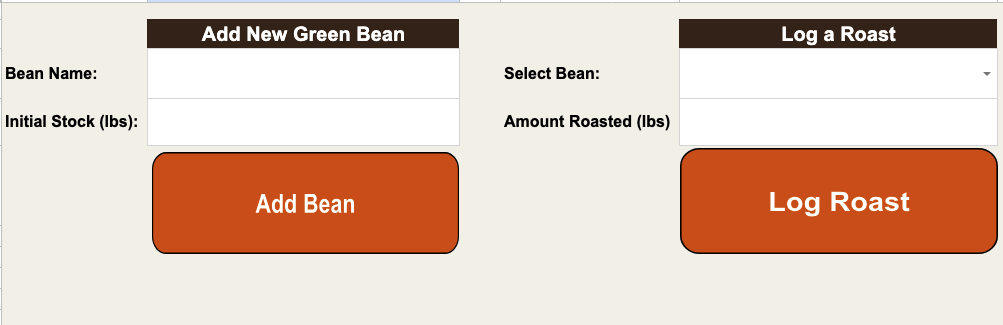
This isn’t a passive list. It’s a “Zero-Setup,” functional application that lives entirely inside Google Sheets. It gives you a software-like dashboard with clear buttons and forms to handle your daily workflow.
When you use the RoastLog Dashboard, you can:
- ⚡ Instantly Add New Beans: Receive a new delivery? Just type the name and the weight, click “Add Bean,” and your inventory ledger is instantly created. No typing into tables required.
- 🔥 Log a Roast in Seconds: Finished a batch? Use the dynamic dropdown to select your bean, type the weight you roasted, and click “Log Roast.” The tool handles all the math, deducting from your stock automatically.
- 📋 See Your Live History: The tool keeps a detailed audit trail of every roast, timestamped and organized, so you can track your consumption trends over the months.
This is a professional-grade inventory tool with a home roaster’s impulse-buy price tag (free).
An Important Note on Safety and Security
When you first open this sheet, you’ll notice a message about “Google Apps Script.” This is the built-in, lightweight coding language that turns this from a boring spreadsheet into a functional application.
That code is the brain that makes the “Add Bean” and “Log Roast” buttons work. It handles the subtraction, rounding, and moving data between tabs.
This script is completely safe and runs entirely inside your personal Google Drive account. No data is ever sent to roastcoffee.ai, to me, or to any third party. Your business data stays private on your shelf. Because the script does “automated tasks,” Google will present you with a one-time permission pop-up when you first use a button—this is a normal, secure part of the process!
Enticed to Get Organized? Get It Free Now!
The “Crawl, Walk, Run” approach to business means starting small but building smart. This free spreadsheet is the perfect “Crawl” to help you master your coffee stock before you ever think about commercial production.
Stop losing track of your favorite beans and start making data-driven roasts.
Click the link below to get your free RoastLog Inventory Template instantly:
👉 [Click to Get Your Free Roast Inventory Template] 👈
(This link will prompt you to “Make a Copy” of the template directly into your Google Drive.)
One Final Request…
If this template helps you get organized, it would mean the world to me if you shared it! Tag roastcoffee.ai in your roast setup photos on Instagram, or better yet, follow my own humble roasting experiments over at @BGSBCoffee. We’re all in this amazing coffee community together, so let’s keep the conversation going!
Happy Roasting, – Ankur @ RoastCoffee.ai